
From first media check to the final cue
Tribute Director gives the operator a calm, repeatable path through the whole service: prepare the running order, verify every cue, rehearse the sequence, run the programme and recover cleanly if something changes.
A five-stage path for every service
Each stage is designed to reduce uncertainty before the audience arrives and keep the operator in control while the service is live.
Build
Create the running order, attach media and prepare the holding screen.
Check
Find missing, invalid or uncertain media before the room is full.
Preview
Move through cues and confirm transitions without sending them live.
Operate
Advance with deliberate controls and visible programme status.
Stabilise
Use holding, black screen, fade and logs when a controlled recovery is needed.
What happens during a typical service build
The operator works through the same practical route each time, so service preparation becomes easier to repeat and easier to check.
Build the service file
Add service details, arrange the running order, attach music, tribute videos, still images, slideshows, lyrics and any planned holding moments.
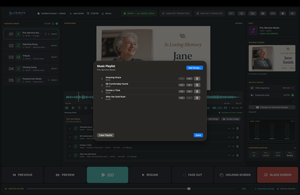
Resolve issues before the day
Use readiness checks to identify missing files, media that will not play, output concerns or anything that needs attention before the service begins.
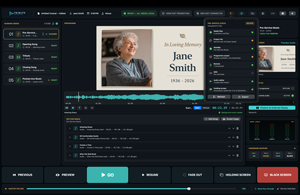
Preview without committing live
Walk through cues, confirm timing and check what the audience will see while keeping the live programme output protected.
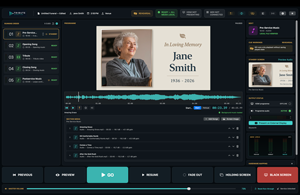
Advance with confidence
Use clear actions such as GO, pause, resume, fade out, holding screen and black screen while the current and next service items remain visible.
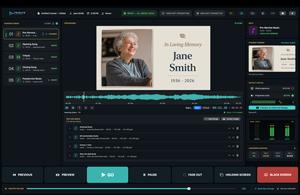
Return to a safe state
If something changes, move calmly to a holding screen, fade the active media, black the display or use fallback media while the service continues.
Prepare once, then verify calmly
The most important work happens before the audience arrives. Tribute Director keeps preparation practical and visible.
Build the running order
Create the service in the order it will happen, so the operator is not searching for files while the service is live.
- Pre-service music and arrival moments
- Opening, reflection and closing items
- Tribute videos, images and lyrics
- Post-service music or exit loops
Check media readiness
Make sure each required item is present, playable and ready before the service begins.
- Missing files can be found early
- Invalid media can be replaced
- Output and audio can be checked
- Backup media can be prepared
Preview, then run deliberately
The operator should always know what is live, what is next and what action will happen when they press GO.
Preview the next cue
Check the next service item before it appears on the programme display.
- Confirm the next media item
- Check the visual state
- Avoid unexpected output
Use deliberate live controls
Keep common live actions clear, visible and intentional.
- GO
- Pause and resume
- Fade out
- Holding screen
- Black screen
Keep output confidence
Separate operator awareness from audience-facing output so the workstation remains useful throughout the service.
- Preview remains available
- Programme state stays visible
- Current and next cues are clear
Recovery is part of the workflow
Funeral services are live events. Tribute Director keeps recovery controls close so the operator can return the room to a controlled state quickly.
Return to a safe screen
Use a holding screen or black screen when the programme needs a calm visual state.
- Before the next cue is ready
- During an unexpected delay
- When a display should be blank
Control audio and video gracefully
Fade or pause media rather than stopping abruptly when the moment calls for a smoother transition.
- Fade out active media
- Pause or resume when appropriate
- Move back to a known state
Use fallback media
Keep backup media or alternate playback options ready for service-critical moments.
- Backup service files
- Important songs available separately
- Venue fallback plan
Review what happened
Use practical context and logs when troubleshooting after the service.
- Operator actions
- State changes
- Support-ready details
One workspace instead of scattered controls
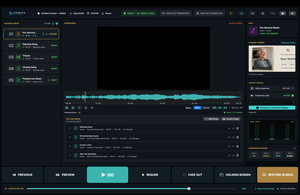
The operator view is designed to keep the important service information visible together.
Running order
The service sequence stays central so the operator can follow the plan from start to finish.
Current and next items
Current output and upcoming cues remain visible to reduce guesswork.
Programme output state
The operator can see whether the room is on media, holding, black or another safe display state.
Media readiness
Preparation checks help surface missing or uncertain service items early.
Live controls
Common actions are presented as clear operator decisions, not hidden menu items.
Remote and room state
When remote or external output features are in use, the operator keeps practical context in view.
Built for real chapel and venue conditions
Tribute Director is designed for the practical setup around funeral homes, chapels, crematoriums and portable AV environments.
Operator workstation
The main computer remains the source of control for the service file, media and output state.
Programme display
A connected HDMI or browser programme output presents the audience-facing service content.
Local remote control
An authorised phone or tablet can control key actions over the local network when the operator needs to move.
Hardware controls
MIDI or mapped controls can support common live actions where a tactile workflow is preferred.
Sound and display checks
Audio routing, display state and venue inputs should be confirmed before guests arrive.
Backup path
A fallback plan keeps the service moving if a file, cable, network or display behaves unexpectedly.
Use a workflow built for the pressure of a live service.
Tribute Director gives operators a practical path through preparation, playback, display control and recovery.
Useful links
Continue to product details, purchase options or support.