Control key service actions from elsewhere in the room
Tribute Director remote control is designed for trusted local operation when the operator needs to step away from the main workstation while keeping the service under deliberate control.
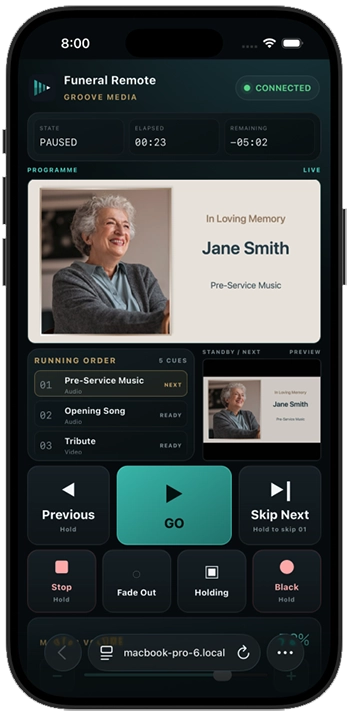
Built for real chapel and venue workflows
Remote control is useful when a trusted operator needs to check the room, stand near family or venue staff, or operate away from the desk for specific moments.
Local network operation
Remote control is intended for authorised devices on the local network, not public cloud control.
- Same local network
- Trusted device pairing
- No unnecessary public access
Deliberate service actions
Keep important live actions clear and intentional even when using a phone or tablet.
- GO and cue movement
- Pause and resume
- Holding and black screen actions
Operator confidence
Remote control complements the main workstation; it does not replace preparation, testing or room checks.
- Main workstation remains the source
- Programme output stays controlled
- Test before guests arrive
A practical setup path
Pair and test remote control before the service, using the same room, network and display setup that will be used live.
Before pairing
Prepare the workstation and network before connecting a remote device.
- Open the correct service file
- Connect to the venue network
- Confirm the operator device is trusted
- Avoid isolated guest Wi-Fi networks
Before the service
Run a real control check before guests arrive.
- Confirm the remote device can connect
- Check the actions you intend to use
- Keep the workstation accessible
- Have a fallback control path ready
Where remote control helps
Remote operation is most useful when room awareness matters as much as workstation control.
Room checks
Move to the audience area to confirm screen visibility, audio level or venue timing.
Small venues
Operate discreetly when the workstation is not positioned where the operator needs to stand.
Service support
Allow a trusted second operator to assist with selected actions when appropriate.
Portable AV setups
Use remote control where the display, sound system and workstation are physically separated.
Holding moments
Return to a safe screen during pauses, delays or transitions.
Recovery support
Use remote actions as part of a tested fallback plan, not as an improvised replacement.
Keep remote control deliberate and local
Because remote control can affect a live service, it should only be available to trusted operators on a controlled local network.
Use trusted devices
Only pair devices operated by people authorised to control the service.
- Avoid shared public devices
- Remove access when no longer needed
- Keep the workstation supervised
Protect the network
Remote control depends on local network conditions and venue equipment.
- Use a stable Wi-Fi or wired network
- Avoid guest networks that isolate devices
- Test connection in the room
Plan your remote-control setup before the service
Remote control should be tested as part of the complete room workflow.