
Content Packs for Tribute Creator
A considered backdrop.
A personal tribute.
Give every story a setting. Discover coordinated backgrounds that complement the photographs at the heart of a tribute.
Optional backgrounds for Tribute Creator slideshows and Tribute Director holding screens.
Requires a valid Tribute Creator licence. Tribute Creator standalone is currently available only from the Tribute Director website, not the App Store.

Serenity Collection · Floral backgrounds in a gentle palette.
Meet the Serenity Collection.
Soft florals. Warm candlelight. Open skies and peaceful water.
A collection of still backgrounds for thoughtful tribute slideshows. Choose a setting that suits the person and the photographs, then make the slideshow your own.
Explore the collection
Find the right atmosphere.
Browse the Serenity previews: lilies and florals, candlelight, skies, sunsets and water.











Warmth
A gentle opening.
Choose a quiet backdrop for the opening title and the name you want to remember.

Continuity
A setting for the memories.
Complement portrait and landscape photographs with a background that brings the slideshow together.

Reflection
Space to say farewell.
Carry the same mood through the tribute and its closing moments.
01 · Save preparation time
Start with a collection.
Browse a coordinated set of backgrounds in one place, with less searching between projects.
02 · Keep it personal
Let the photographs lead.
Choose the setting around the person’s story. Your own photos and videos remain the focus.
03 · Work inside Creator
Stay in your workflow.
Browse, download and select licensed backgrounds in Tribute Creator, then preview the finished result.
Add a Content Pack
From purchase to your library.
Content Packs are optional. You can create tributes with your own media without purchasing a pack.
Check your access.
Review your licence and current pack options. If Serenity is already included with your licence, use that access.
Otherwise, select an available pack purchase for your account and review its price and terms before checkout.
Open Content Pack Management.
In the app’s menu bar, choose Tribute Creator → Content Pack Management…
Refresh the available packs after your purchase so Creator can recognise your access.
Download your backgrounds.
Browse the pack and download the backgrounds you want to use. Wait for the downloads to finish before preparing your tribute.
An internet connection is needed to check access and download content.
Build your tribute
Choose. Preview. Render.
Open a slideshow and go to Slideshow Settings → Background → Background Library. Use View All to browse the library, then select a downloaded background.
Add your photos and videos, edit the photographs, set the title and choose a transition. Preview the background with your media before rendering.
Export the finished tribute as an MP4, then use it in your Tribute Director service workflow.
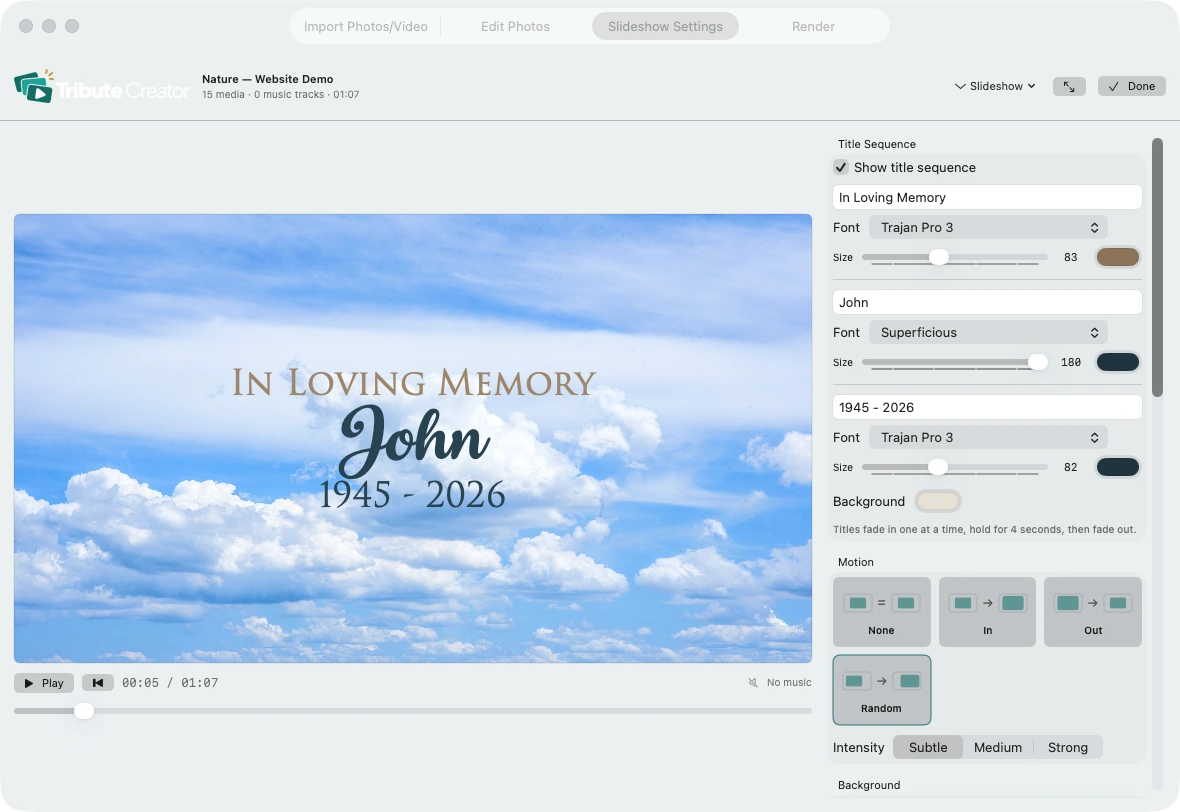
Real Tribute Creator interface · John demo. Background controls are part of Slideshow Settings.
Looking ahead
More ways to set the scene.
Further Content Packs and updates are planned. Each release will have its own content details, compatibility requirements, price and availability announced when ready.
There are no promised release dates. A Serenity purchase does not promise free future packs or free updates.
What to expect
A growing choice.
- New visual collections as they are released
- Clear previews before you choose
- Release details and purchase terms for each pack
Future themes and contents are still to be announced.
Good to know
Content for Tribute Creator.
In Tribute Director 1.2.4 or later, open Funeral Settings, choose an Image background and open Content Packs to select an entitled background for your holding screen. Your account shows which packs you can use.
Choose with confidence.
Check the current offer for included content, eligibility, price and usage terms before purchasing. Pack access follows the licence and entitlement shown for your account.
Serenity Collection
Give the memories a setting.
Explore the first Content Pack, then check the options available for your Tribute Creator licence.